Garry's Mod Wiki

util.IntersectRayWithTriangle

  Vector, number util.IntersectRayWithTriangle( Vector rayOrigin, Vector rayEnd, Vector triA, Vector triB, Vector triC, boolean oneSided = false )

Recently Added

This was recently added in version (2026.07.16). It might only be available on the Dev Branch right now.

Description

Performs a ray-triangle intersection and returns the hit position or nil.

Arguments

1 Vector rayOrigin
Origin/start position of the ray.
2 Vector rayEnd
The end position of the ray.
3 Vector triA
The first vertex of the triangle.
4 Vector triB
The second vertex of the triangle.
5 Vector triC
The third vertex of the triangle.
6 boolean oneSided = false
Whether the triangle can be hit from only one side (true) or from both sides (false).

This assumes clockwise vertex arrangement to determine the "hittable" side.

Returns

1 Vector
The position of intersection, nil if not hit.
2 number
The fraction of start position to end position in range of [0,1] to the hit point, if there was a hit. i.e. 0.5 would be a hit in the exact middle of start and end positions.

Example

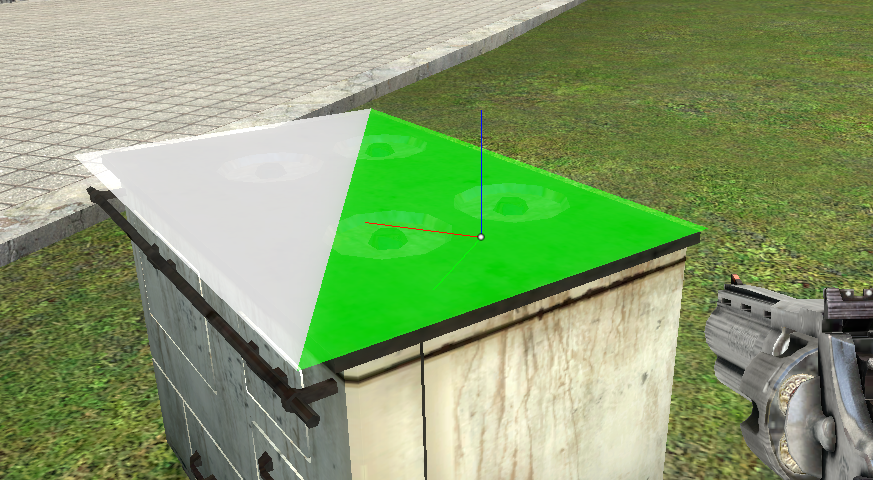
-- Store entity we look at, so we have a reference to test again local ent = NULL hook.Add( "Think", "Think_IntersectRayWithTriangleExample", function() -- Store player object local ply = LocalPlayer() -- If player looked at some valid entity, swtich our entity to that local trEnt = ply:GetEyeTrace().Entity if ( IsValid( trEnt ) ) then ent = trEnt end -- No entity? do nothing if ( !IsValid( ent ) ) then return end local rayStart = ply:GetShootPos() local rayEnd = rayStart + ply:GetAimVector() * 500 -- OBB corners (local space) local mins = ent:OBBMins() local maxs = ent:OBBMaxs() -- Top face corners local p1 = ent:LocalToWorld( Vector( mins.x, mins.y, maxs.z ) ) local p2 = ent:LocalToWorld( Vector( maxs.x, mins.y, maxs.z ) ) local p3 = ent:LocalToWorld( Vector( maxs.x, maxs.y, maxs.z ) ) local p4 = ent:LocalToWorld( Vector( mins.x, maxs.y, maxs.z ) ) local color1 = Color( 255, 255, 255, 128 ) local color2 = Color( 255, 255, 255, 100 ) -- Test first triangle local hitpos = util.IntersectRayWithTriangle( rayStart, rayEnd, p1, p2, p3 ) if ( hitpos ) then color1 = Color( 0, 255, 0, 128 ) end -- If that misses, test the second half of the quad if ( !hitpos ) then hitpos = util.IntersectRayWithTriangle( rayStart, rayEnd, p1, p3, p4 ) if ( hitpos ) then color2 = Color( 0, 255, 0, 100 ) end end -- Draw the hit position if we hit a triangle if ( hitpos ) then debugoverlay.Axis( hitpos, angle_zero, 10, 0.01 ) end -- Draw the triangles debugoverlay.Triangle( p3, p2, p1, 0.01, color1, true ) debugoverlay.Triangle( p4, p3, p1, 0.01, color2, true ) -- Draw the back sides too debugoverlay.Triangle( p1, p2, p3, 0.01, color1, true ) debugoverlay.Triangle( p1, p3, p4, 0.01, color2, true ) end )
Output:
image.png